
Widget not showing? Troubleshooting guide
Common reasons your widget might not display and how to fix them.
Check the embed code
Make sure you copied the complete embed code and pasted it correctly into your website's HTML. The code should include both a <script> tag and a container element. Missing either part will prevent the widget from loading.
Check for JavaScript errors
Open your browser's developer tools (F12) and check the Console tab for any JavaScript errors. Errors from other scripts on your page can sometimes interfere with the widget loading.
Content Security Policy (CSP)
If your website uses a Content Security Policy, make sure it allows loading scripts and styles from the Review Widget domain. Contact your web developer to update the CSP headers if needed.
Caching
Your website or CDN might be serving a cached version of the page that doesn't include the widget code yet. Try clearing your website's cache or adding a cache-busting parameter to the page URL.
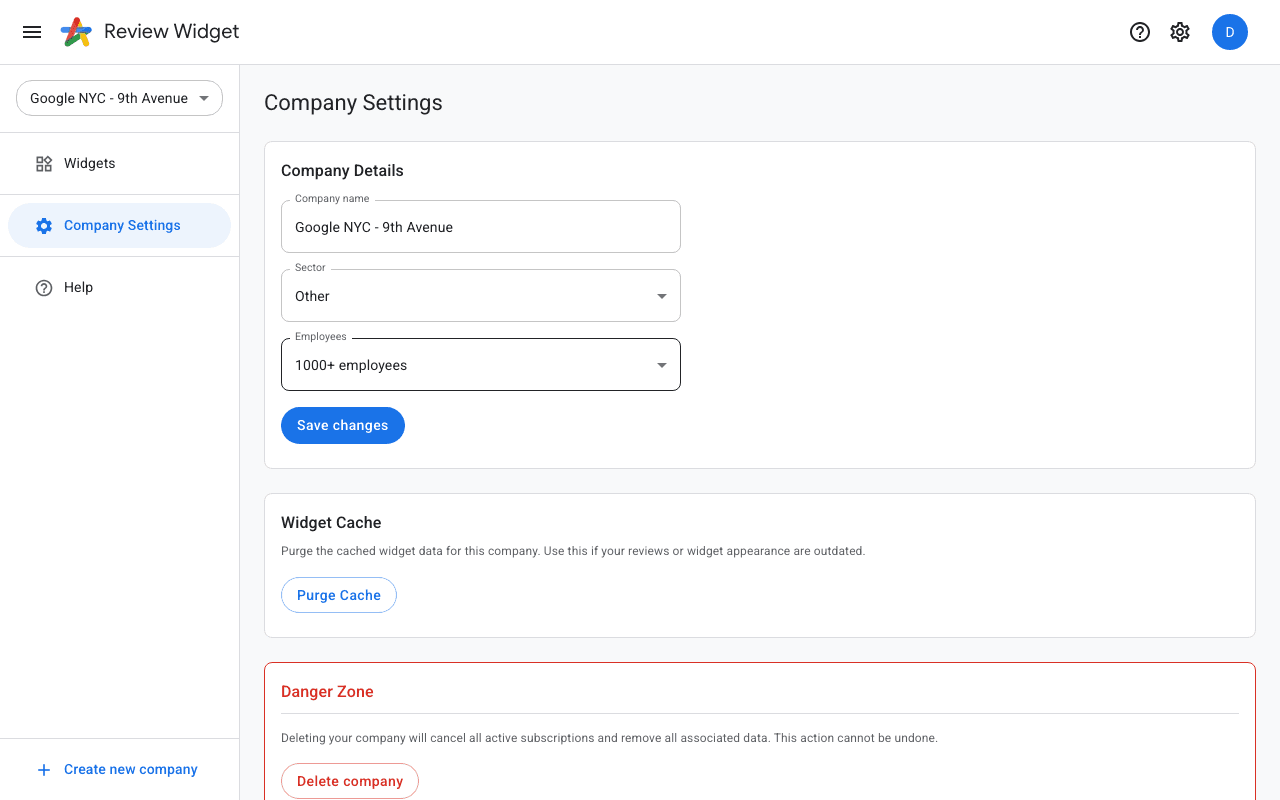
Purge the widget cache
If your widget shows outdated reviews or does not update after changes, the issue may be caused by cached widget data on our servers. You can flush this cache from your dashboard: go to Company Settings in the sidebar, scroll down to the "Widget Cache" section, and click the "Purge Cache" button. This clears the cached data for all widgets of your company and forces a fresh reload the next time the widget is displayed on your website.
Widget API connection
In rare cases the widget API connection might need to be re-established. Go to Company Settings in the dashboard and look for a "Sync" or "Reconnect" option to refresh the connection.